
Build Smarter AI Apps with LangChain
Maven Session

Aki Wijesundara, PhD
Instructor
What we'll cover in this session
The problem with LLMs and how RAG solves it
How text becomes vectors and why it matters
Storing and searching semantic data at scale
The make-or-break step most people get wrong
Build a working Document Q&A system
By the end of this session, you will:
How RAG works end-to-end
How vectors power semantic search
Working document Q&A with LangChain
Format: Theory → Architecture → Live Build → Evaluation
LLMs are powerful but have critical limitations
They don't know what happened after training
They confidently make things up
Can't read your docs, PDFs, Slack, databases
The question: How do we ground LLM responses in real, up-to-date, trusted information?
Retrieval-Augmented Generation
Think of it like an open-book exam — the LLM doesn't need to memorize everything, it just needs to look up the right pages.
Choose the right approach for your use case
| Approach | When to Use | Cost | Freshness |
|---|---|---|---|
| Prompt Engineering | Small context, simple tasks | Low | Manual updates |
| RAG | Large/changing knowledge bases | Medium | Real-time |
| Fine-Tuning | Changing model behavior/tone | High | Requires retraining |
Key insight: RAG handles knowledge, fine-tuning handles behavior — they're not either/or.
The offline step: prepare your knowledge base for search
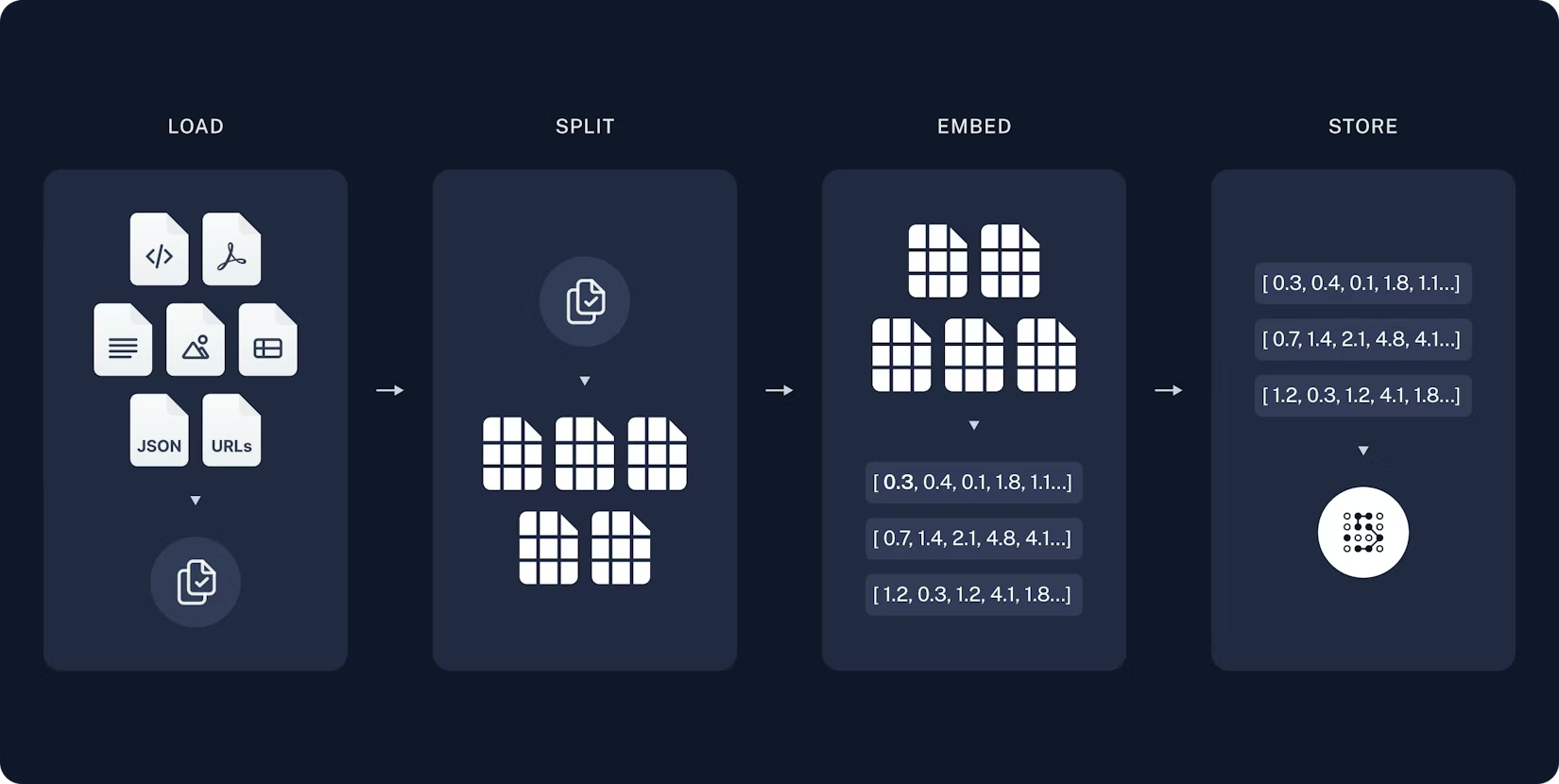
Indexing Steps
1. Load documents (PDF, web, etc.)
2. Split into chunks
3. Embed each chunk
4. Store in Vector DB
One-time setup — run once per document update
Source: LangChain Documentation
The runtime step: answer questions using your knowledge
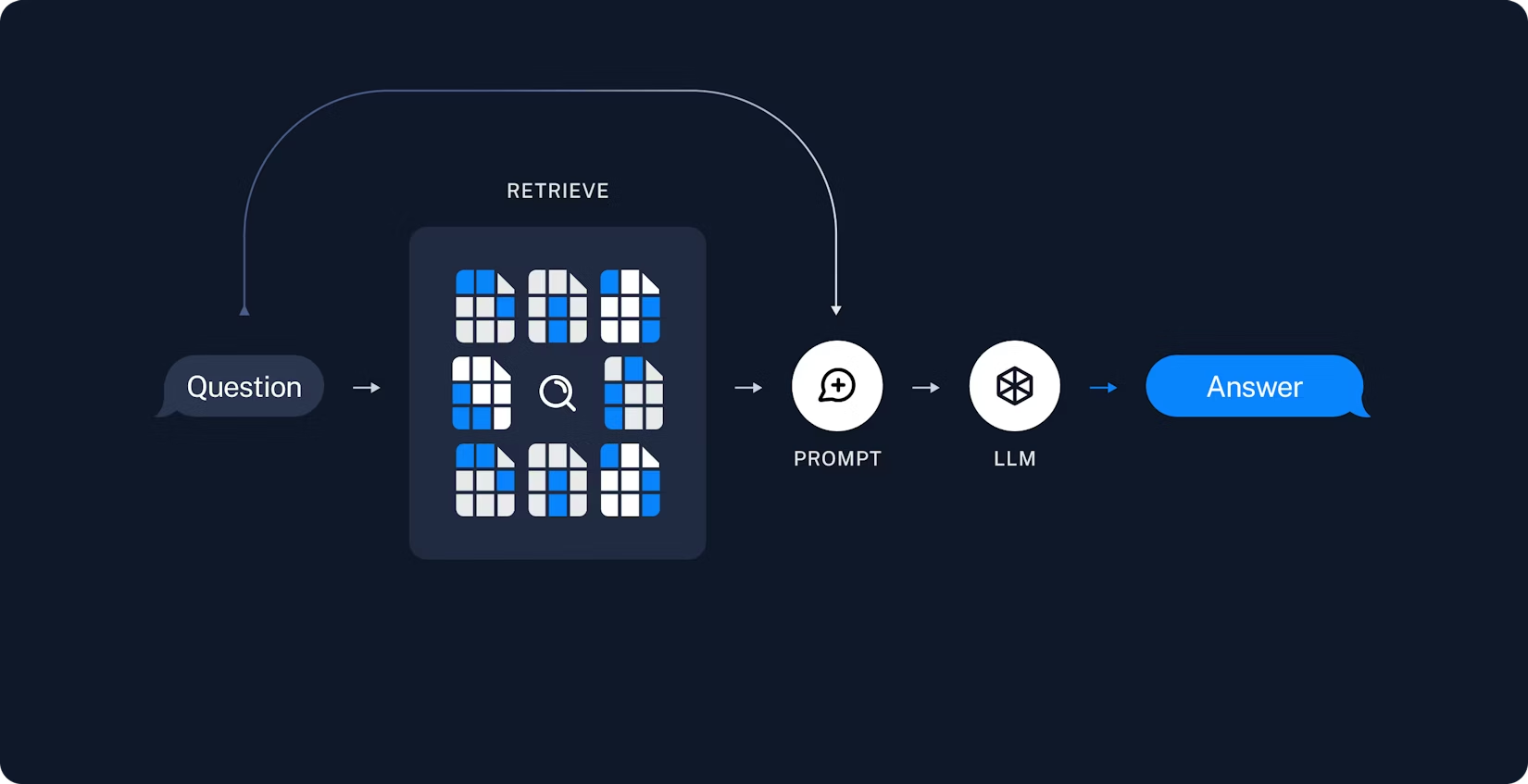
Query Steps
1. User asks question
2. Embed the query
3. Search vector DB
4. Retrieve top K chunks
5. Augment prompt
6. LLM generates answer
Every query — runs in real-time
Source: LangChain Documentation
Combining indexing and retrieval into a unified system
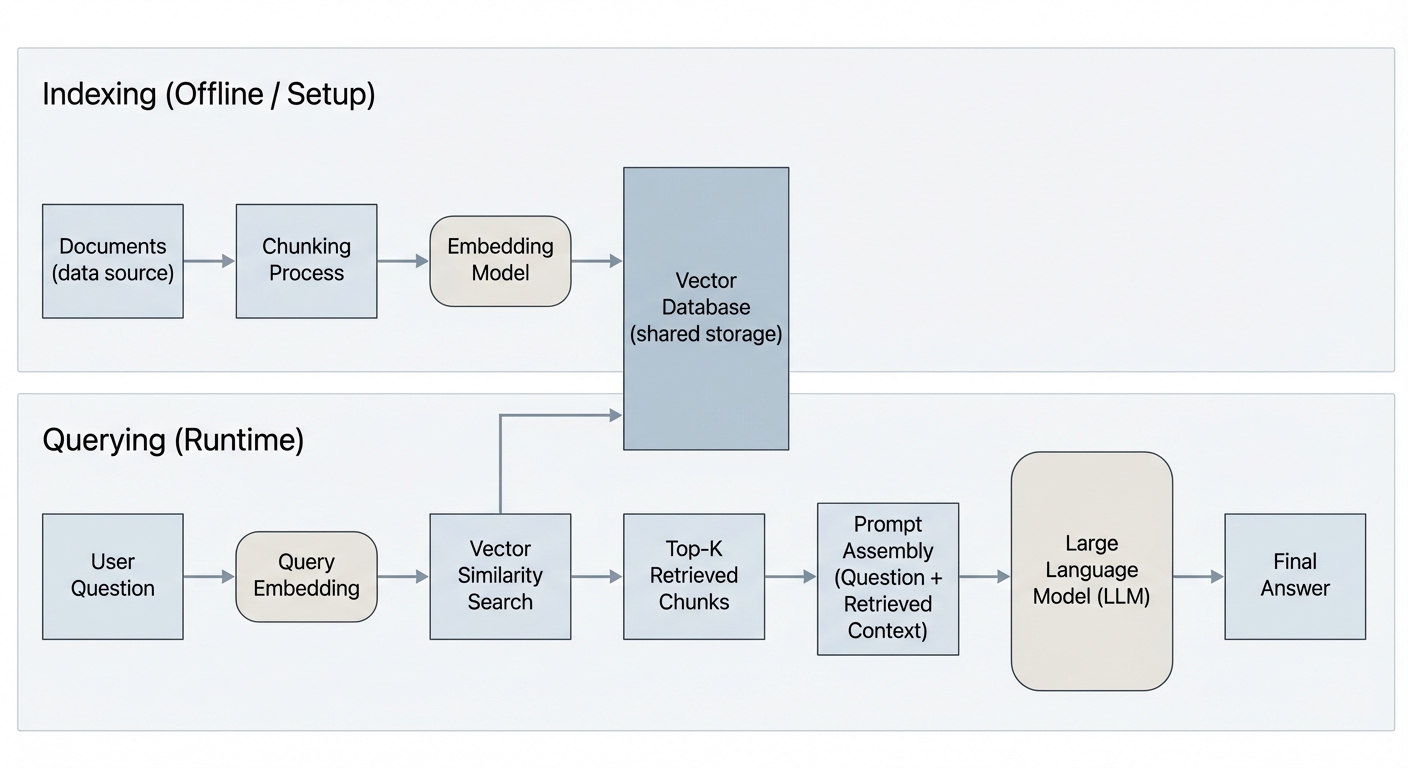
Indexing (Offline)
Load → Chunk → Embed → Store in Vector DB
Retrieval (Runtime)
Query → Embed → Search → Retrieve Top K
Generation
Augment Prompt → LLM → Grounded Answer
Key insight: Same embedding model for both indexing and querying!
A numerical representation of text that captures semantic meaning
# Similar meanings → Similar vectors
"The cat sat on the mat"     → [0.12, -0.34, 0.56, ...]
"A kitten rested on the rug" → [0.11, -0.33, 0.55, ...] ← Very similar!

# Different meanings → Different vectors
"Stock prices fell sharply"  → [0.87, 0.22, -0.91, ...] ← Very different
Why it matters: Similar meanings → similar vectors → we can search by meaning, not just keywords.
Imagine a space where every sentence has a position
Semantic search: Your query gets placed in this space and we find the nearest neighbors.
Choose based on your use case
| Model | Dimensions | Provider | Best For |
|---|---|---|---|
| text-embedding-3-small | 1536 | OpenAI | Cost-effective, general purpose |
| text-embedding-3-large | 3072 | OpenAI | Higher accuracy tasks |
| voyage-3 | 1024 | Voyage AI | Code & technical docs |
| all-MiniLM-L6-v2 | 384 | HuggingFace | Local/free, lightweight |
Tradeoff: More dimensions = more nuance but higher storage & latency.
Before embedding, you need to split documents into chunks
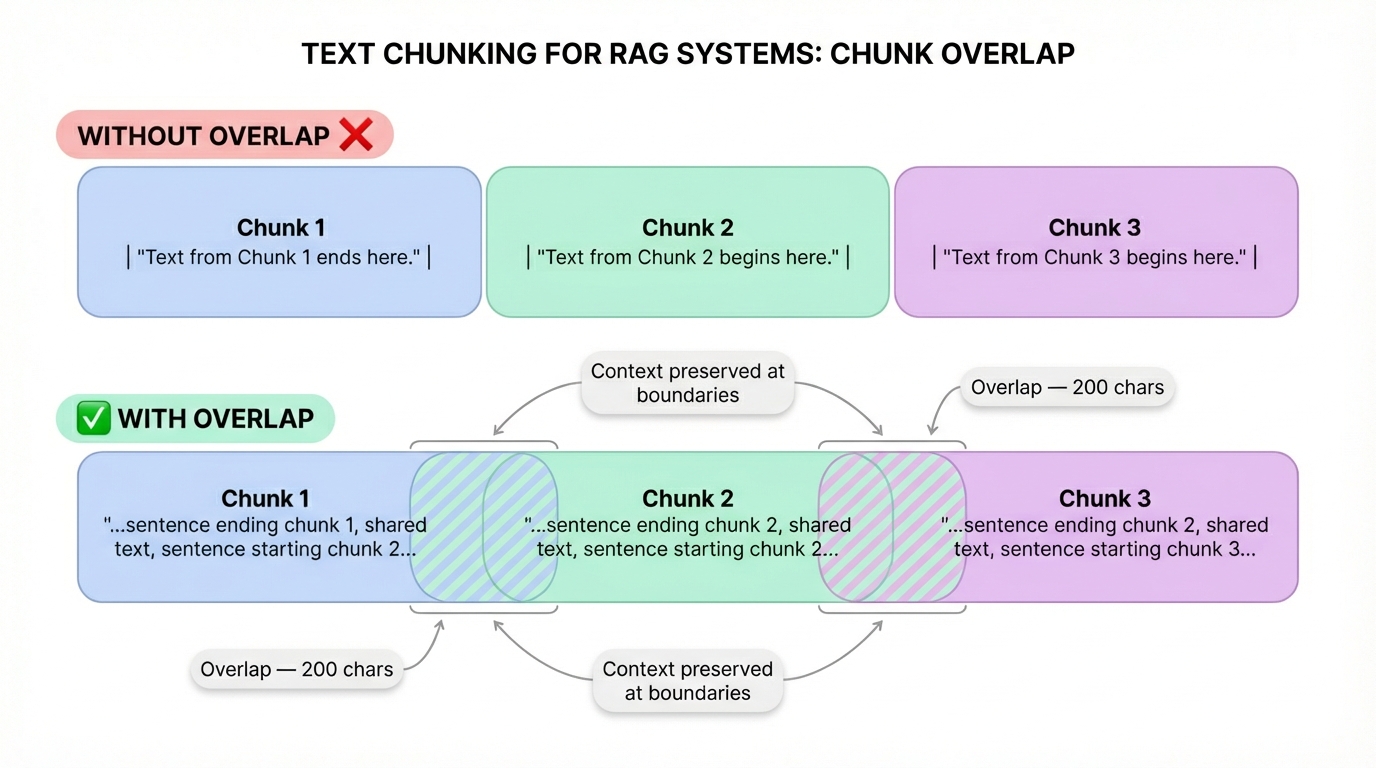
Models have limits (512–8192 tokens)
Smaller chunks = precise retrieval
Too large = diluted; too small = lost context
Different approaches for different use cases
| Strategy | How It Works | Best For |
|---|---|---|
| Fixed-size | Split every N characters/tokens | Simple, predictable |
| Recursive | Split by paragraphs → sentences → words | General-purpose (LangChain default) |
| Semantic | Split when meaning shifts | High-quality but slower |
| Document-aware | Split by headers, sections, pages | Structured docs (markdown, HTML) |
Pro tip: Always use overlap (e.g., 200 chars) between chunks so you don't lose context at boundaries.
Specialized storage optimized for high-dimensional vectors
SELECT * FROM docs
WHERE title = 'RAG'
Exact match only
# Find 5 most similar
db.similarity_search(
  query_vector, k=5
)
Semantic match
Uses algorithms like HNSW or IVF to search millions of vectors in milliseconds.
Pick the right tool for your needs
Open source, embedded. Great for prototyping.
Managed cloud. Serverless, easy to scale.
Hybrid search (vector + keyword).
Filtering + payload support.
Postgres extension. Use existing DB.
Meta library. Fast local search.
For today's build: We'll use ChromaDB (simple, local, zero config)
Cosine Similarity — The most common metric
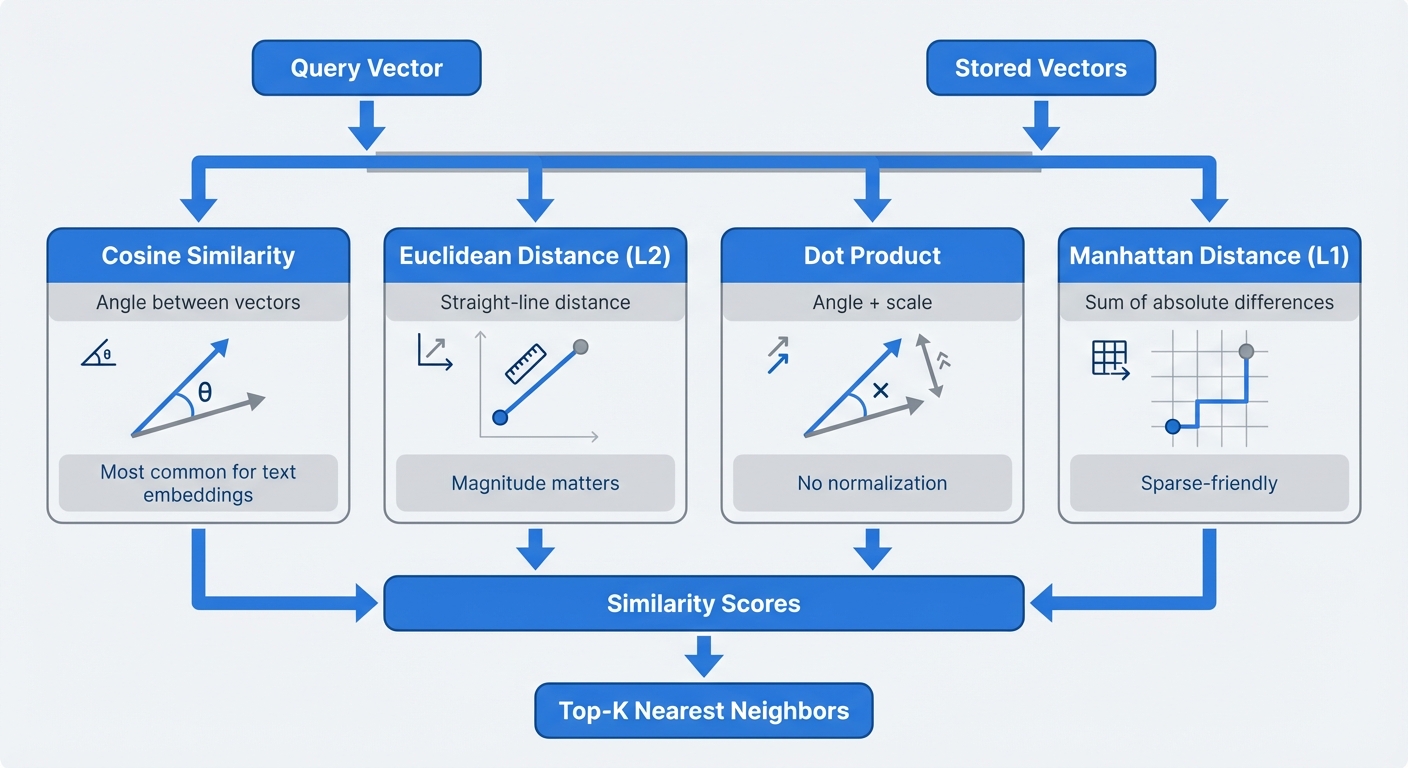
Measures the angle between vectors
Straight-line distance between points.
Similar to cosine but scale-sensitive.
Basic: embed query → cosine search → return top K. Here's how to do better:
Filter by date, source, category before vector search
Combine vector similarity with keyword matching (BM25)
Rephrase question multiple ways, search each, merge results
Use a cross-encoder to re-score the top results
Format retrieved chunks into the LLM prompt
# The RAG prompt template
prompt = """
You are a helpful assistant. Answer the question based ONLY on
the following context. If the context doesn't contain the answer,
say "I don't have enough information to answer that."

Context:
{retrieved_chunks}

Question: {user_question}
""""Use ONLY this context"
Ask for citations
"I don't know" reduces hallucination
What we're building: A Document Q&A system
Install dependencies and load your documents
# Install dependencies
pip install langchain langchain-openai langchain-community chromadb
# Load documents
from langchain_community.document_loaders import PyPDFLoader
loader = PyPDFLoader("your_document.pdf")
documents = loader.load()LangChain supports 80+ loaders: PDF, CSV, Notion, Slack, URLs, Google Drive, etc.
Split documents into manageable pieces
from langchain_text_splitters import RecursiveCharacterTextSplitter

text_splitter = RecursiveCharacterTextSplitter(
    chunk_size=1000,
    chunk_overlap=200,
    separators=["\\n\\n", "\\n", " ", ""]
)

chunks = text_splitter.split_documents(documents)
print(f"Split into {len(chunks)} chunks")
Why RecursiveCharacterTextSplitter? It tries to split at natural boundaries (paragraphs → sentences → words).
Convert chunks to vectors and store in ChromaDB
from langchain_openai import OpenAIEmbeddings
from langchain_community.vectorstores import Chroma

embeddings = OpenAIEmbeddings(model="text-embedding-3-small")

vectorstore = Chroma.from_documents(
    documents=chunks,
    embedding=embeddings,
    persist_directory="./chroma_db"
)
1. Chunks → Embedding API
2. Vectors → ChromaDB
3. Persisted to disk
Test your retrieval before wiring up the LLM
# Simple similarity search
results = vectorstore.similarity_search(
    "What are the key findings?",
    k=3
)

for doc in results:
    print(doc.page_content[:200])
    print(doc.metadata)
    print("---")
⚠️ Test this first! If retrieval is bad, generation will be bad — garbage in, garbage out.
Connect retrieval to the LLM using modern agent pattern
from langchain_openai import ChatOpenAI
from langchain.agents import create_agent
from langchain.tools import tool

model = ChatOpenAI(model="gpt-4o-mini", temperature=0)

# Create retrieval tool
@tool(response_format="content_and_artifact")
def retrieve_context(query: str):
    """Retrieve information from documents."""
    docs = vectorstore.similarity_search(query, k=3)
    serialized = "\n\n".join(
        f"Source: {doc.metadata}\nContent: {doc.page_content}"
        for doc in docs
    )
    return serialized, docs

# Create agent
tools = [retrieve_context]
agent = create_agent(model, tools, system_prompt="Use the tool to answer queries.")

# Query
for event in agent.stream(
    {"messages": [{"role": "user", "content": "What is RAG?"}]},
    stream_mode="values"
):
    print(event["messages"][-1].content)
Modern pattern: Agent decides when to retrieve, supports multiple searches per query
Know the symptoms and fixes
| Problem | Symptom | Fix |
|---|---|---|
| Bad chunking | Half-relevant text | Adjust chunk size, semantic splitting |
| Wrong K value | Too much noise or missing context | Experiment with K=3 to K=10 |
| Embedding mismatch | Irrelevant results | Try different embedding model |
| Prompt leakage | LLM ignores context | Strengthen grounding instructions |
| Boundary issues | Answer split across chunks | Increase chunk overlap |
You can't improve what you can't measure
Are the right chunks being returned?
Is the answer grounded in the context?
Is the answer factually right?
Quick evaluation approach:
Tools: RAGAS, LangSmith, manual review
Once your basic RAG works, explore:
Combine BM25 keyword search with vector search
Use a cross-encoder (e.g., Cohere Rerank) to re-score results
Embed images, tables, charts alongside text
Let the LLM decide when and what to retrieve
The essential points to remember
RAG = Retrieval + Augmentation + Generation — it's an open-book exam for LLMs
Embeddings capture meaning — enabling search by concept, not just keywords
Chunking is critical — bad chunks = bad retrieval = bad answers
Always test retrieval first — before wiring up generation
Start simple, iterate — basic RAG with good chunking beats complex RAG with bad data
The task: Build a working document Q&A pipeline using real data you care about — not a tutorial dataset.
What to submit: Working notebook + short README with your observations — including what broke.
Let's discuss what we've learned today
Your challenge: Build a RAG system on YOUR data this week!